
It's 10pm on a Thursday evening. A woman scrolling Instagram spots her friend's gorgeous new balayage and immediately grabs her phone to search "hair salon near me". Within 30 seconds, she's booked an appointment at the first salon whose website loaded quickly, showed stunning portfolio photos, and had a simple online booking button.
That salon just filled a £120 appointment slot—without answering a single phone call. The other salons in the search results? They lost out. Not because they lack talent, but because they either had no website, no online booking, or a site that looked like it hadn't been updated since 2019.
This scenario plays out thousands of times every day across the UK. The hair and beauty industry generates £5.8 billion in annual turnover, with over 61,000 businesses competing for clients (National Hair & Beauty Federation, 2024). Your website is the difference between a full appointment book and empty chairs.
Whether you run a hair salon, nail bar, beauty salon, barbershop, spa, or aesthetics clinic, this guide will show you exactly how to build a website that attracts new clients, reduces no-shows, and grows your business in 2026.
Why Beauty Businesses Are Losing Clients Without a Website
Let's start with the reality of how UK consumers find beauty services in 2026:
- 98% of consumers search online for local businesses before visiting (BrightLocal Local Consumer Review Survey, 2024)
- 86% of salon-related searches happen on mobile devices (Google Consumer Insights, 2024)
- 76% of "near me" searches on mobile result in a visit or call within 24 hours (Google/Ipsos)
- 94% of people would choose a new service provider if they offered online booking (Trafft Booking Trends Report, 2024)
Here's what this means for your beauty business: when someone wants their nails done for a wedding next weekend, needs a facial before a holiday, or wants an emergency hair appointment after a colour disaster—they're searching on their phone right now. If your business doesn't appear, or your website doesn't make it easy to book, they'll go to a competitor who does.
The Instagram Illusion
Many beauty businesses rely solely on Instagram. And it's understandable why—Instagram is a powerhouse for the beauty industry. An estimated 96% of beauty brands maintain an active Instagram presence, and 80% of consumers use Instagram to help decide on purchases (Influencer Marketing Hub, 2024). It's visual, it's free, and it's where your clients spend their time.
But here's the problem: Instagram is not a website replacement.
- Instagram doesn't rank on Google. When someone searches "beauty salon Manchester" or "nail salon near me," your Instagram page rarely appears in results. A website does.
- You don't own Instagram. Algorithm changes can slash your visibility overnight. Meta has reduced organic reach multiple times—businesses that built their entire presence on Instagram have seen engagement drop by 50% or more (Hootsuite Social Trends Report, 2024).
- Instagram can't take bookings or deposits. You can't integrate a proper booking system, collect deposits, or display a structured treatment menu with pricing on Instagram.
- Instagram isn't searchable by service. Someone searching for "balayage specialist Leeds" won't find your Instagram reel—they'll find websites optimised for that exact search.
The most successful salons use Instagram and a website together—Instagram as the shop window, the website as the shop. We've written a detailed guide on why you need both a website and social media if you'd like to explore this further.
The Booking Platform Dependency Problem
Many salons rely on platforms like Treatwell, Fresha, or Booksy to handle their online presence and bookings. While these can provide a steady stream of clients, they come with significant downsides:
- Commission fees of 20-35% on every booking made through the platform (Treatwell Partners)
- No brand building—clients remember Treatwell, not your salon name
- Limited control over client communication and marketing
- Price competition—you're listed alongside every other salon in your area, competing primarily on price
- Data ownership—the platform owns the client relationship, not you
A professional website lets you attract clients directly and keep 100% of your revenue. You can still use booking platforms alongside your website, but your website should be the hub of your online presence—the asset you own and control.
Essential Website Features for Salons, Spas, and Beauty Businesses
Not all websites are created equal. A website designed specifically for beauty businesses needs different features than one built for a restaurant or accountant. Here's what yours must include:
1. Online Booking System
This is the single most important feature for any beauty business website in 2026. The data is clear:
- 72% of salons now use online booking systems (Booksy Salon Industry Statistics, 2024)
- 40% of appointments are booked outside business hours—evenings and weekends when your phone isn't being answered (Trafft, 2024)
- 82% of online salon bookings are made on mobile phones (Square Beauty Industry Report, 2024)
Think about that last statistic. If a potential client visits your website at 9pm on a Sunday and can't book an appointment, they'll find a salon where they can. Every hour without online booking is an hour you're losing potential clients.
A proper booking system integrated into your website should include real-time availability, a service menu with durations and pricing, stylist or therapist selection, automatic confirmation emails or texts, and calendar sync for your staff.
2. Deposit and Cancellation Policy Integration
No-shows are the silent killer of salon profitability. The numbers are staggering:
- UK salons collectively lose an estimated £1.2 billion annually to no-shows and last-minute cancellations (Timely: The Proven Strategy to Reduce No-Shows, 2024)
- The average salon no-show rate sits between 10-20% of all appointments (Phorest Salon Software Industry Data, 2024)
- For a busy salon, that can translate to £15,000-£30,000 in lost revenue per year (NHBF, 2024)
The solution? Online deposits collected at the time of booking through your website.
Salons that implement deposit collection through their websites typically see no-show rates drop by 55% or more (Timely, 2024). Phorest salons using online deposits saw no-shows fall by 65%, with rates dropping from 5.4% to 1.9% (Phorest, 2025).
"Since implementing online deposits through our website, our no-show rate dropped from 18% to under 5%. That's worth thousands of pounds every month we used to simply write off."
Best practice for deposits:
- 20-50% of service cost for high-value treatments (colour, extensions, spa packages)
- Flat-rate deposits of £10-£25 for standard appointments
- Display your policy clearly on your website before the booking stage, not after
- Pair deposits with automated reminders—SMS 24 hours and 2 hours before the appointment
- Be fair but firm—a 24-48 hour cancellation window is industry standard
3. Service Menu with Pricing
Unlike some service industries, beauty clients expect to see prices before booking. Hiding your prices creates suspicion and friction—clients will simply go to a competitor who's transparent about their pricing.
Your service menu should be clear, organised by category, and easy to scan:
| Treatment | Duration | Price |
|---|---|---|
| Cut & Blow Dry | 60 mins | From £45 |
| Full Head Colour | 90 mins | From £85 |
| Balayage / Highlights | 120 mins | From £110 |
| Gel Manicure | 45 mins | From £30 |
| Classic Facial | 60 mins | From £55 |
| Lash Extensions (Full Set) | 120 mins | From £75 |
| Full Body Massage | 60 mins | From £60 |
Use "from" pricing where costs vary based on hair length, area size, or other factors. Include treatment durations so clients can plan their visit, and add brief descriptions of what each treatment involves.
4. Gallery and Portfolio
Beauty is a visual industry. This is where your website can truly shine—and where it has a massive advantage over a simple social media profile. Your gallery is often the second most-visited page after your homepage.
What to showcase:
- Before and after photos—especially for hair colour, extensions, nails, and skin treatments
- Finished looks—styled updos, creative nail art, makeup artistry
- Your salon space—interior shots showing ambience, cleanliness, and atmosphere
- Your team at work—builds personal connection and trust
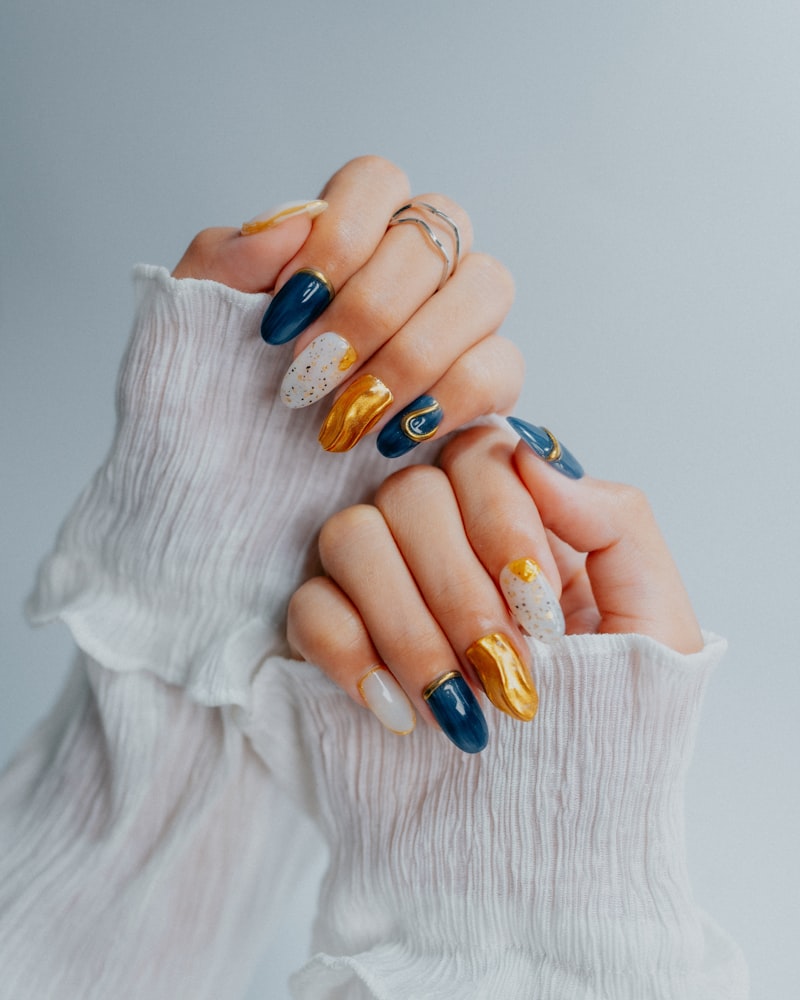
Invest in good lighting and learn basic smartphone photography. Natural daylight near a window works beautifully for hair and nail shots. Blurry, poorly lit photos of your work will actively drive clients away—quality matters.
5. Google Reviews Integration
Reviews are non-negotiable for beauty businesses. The data speaks for itself:
- 93% of consumers say online reviews influence their buying decisions (BrightLocal, 2024)
- 71% of consumers won't consider a business rated below 3 stars (BrightLocal, 2024)
- Businesses with 4.0-4.5 stars actually convert better than those with a perfect 5.0—consumers find perfect scores less trustworthy (BrightLocal, 2024)
Display your Google rating prominently on your website and link directly to your Google Business Profile so satisfied clients can leave reviews easily.
6. Staff Profiles
Beauty is deeply personal. Clients choose a stylist or therapist, not just a salon. Your website should feature individual team profiles including:
- A professional but friendly photo
- Their specialisms (balayage specialist, nail art, bridal makeup, skin treatments)
- Relevant qualifications and training
- A brief, personable bio
When a new client can see who they'll be working with before they arrive, they're more likely to book—and more likely to feel comfortable when they walk through your door.
7. Contact and Location Information
This sounds obvious, but you'd be surprised how many salon websites bury their contact details. Your website must prominently display:
- Phone number (click-to-call on mobile—when tapped, it should immediately dial)
- Full address with an embedded map
- Opening hours (keep these updated—few things frustrate clients more than turning up to find you closed)
- Parking information and public transport links
- Email address or professional contact form
How to Structure Your Beauty Business Website
Now you know what features you need, let's look at how to organise them. A well-structured website helps clients find what they need quickly and helps Google understand your business. Here's the optimal page structure for beauty businesses:
Essential Pages
Homepage: Your first impression. Immediately communicate what you offer, where you're located, what makes you different, and include a prominent "Book Now" button. Feature your best portfolio images above the fold.
Services / Treatment Menu: Your complete list of treatments with pricing, durations, and descriptions. If you offer a wide range of services, consider separate pages for each category (hair, nails, beauty, body)—this also helps with SEO.
About Us: Your story, your values, your qualifications. Clients want to know the people behind the business. This is where you build emotional connection.
Gallery / Portfolio: Your visual showcase. Organised by category, regularly updated with your latest work.
Book Now: Your online booking page with deposit collection. This should be reachable from every page on your site.
Reviews / Testimonials: Social proof from happy clients. Integrate Google reviews or feature curated testimonials.
Blog (optional but valuable): Hair care tips, seasonal trends, product recommendations, behind-the-scenes content. Great for SEO and keeping your website fresh.
Want to see how the website creation process works? Take a look at our step-by-step guide.
Covering All Your Services
If your business spans multiple disciplines, make this clear on your website. Different beauty businesses should emphasise different things:
- Hair salons: Colour services, cut styles, treatment options (keratin, Olaplex), individual stylist portfolios, and colour consultation booking
- Nail salons: Gel, acrylic, BIAB, nail art galleries, seasonal designs, and hygiene standards
- Beauty salons: Facials, waxing, lash and brow treatments, tanning, and treatment package deals
- Barbershops: Haircuts, beard grooming, hot towel shaves, walk-in vs. appointment availability, and loyalty schemes
- Spas: Treatment packages, day spa experiences, gift vouchers, relaxation facilities, and couple's treatments
- Aesthetics clinics: Treatment information, practitioner qualifications, before/after results, safety certifications, and consultation booking
Online Booking and Deposits: A Step-by-Step Setup Guide
Now let's get practical. Here's exactly how to set up online booking and deposit collection for your beauty business.
Choosing the Right Booking System
You have three main options:
Website-integrated booking (recommended): A booking system built directly into your website. Clients never leave your site to book, you control the experience entirely, and you keep all client data. This is the approach used by Vezra's integrated booking system.
Third-party platforms (Fresha, Treatwell, Booksy): These provide booking functionality but at the cost of commission fees and brand dilution. You're building their platform, not yours.
Social media booking (Instagram, Facebook): Better than nothing, but limited in functionality. No deposit collection, no automated reminders, and poor integration with your business systems.
Our recommendation: use website-integrated booking as your primary system. You can still list on third-party platforms for additional visibility, but drive as many bookings as possible through your own website.
Setting Up Deposits That Work
- Decide your deposit structure: Percentage-based (20-50% of treatment cost) works best for high-value services. Flat-rate deposits (£10-£25) are simpler for standard appointments.
- Write a clear, fair cancellation policy: Industry standard is 24-48 hours' notice for a full refund. Be specific about what happens to the deposit if someone cancels late or doesn't show.
- Display the policy prominently: On your booking page, your services page, and in your footer. Transparency builds trust.
- Configure automated payment collection: Deposits should be collected at the time of booking via card payment. Manual bank transfers create friction and drop-off.
- Set up automated confirmations and reminders: Email confirmation immediately, SMS reminder 24 hours before, and a final reminder 2 hours before.
- Track your no-show rate: Measure before and after implementing deposits so you can quantify the improvement. Most salons see dramatic results within the first month.

Automated Reminders: The No-Show Safety Net
Even with deposits in place, automated reminders reduce cancellations further. Research from salon software providers shows that automated SMS and email reminders alone can reduce no-shows by up to 30% (Phorest, 2024). Combined with deposits, you're looking at no-show rates as low as 2-5%.
The ideal reminder schedule:
- Immediately after booking: Email confirmation with appointment details, your address, parking information, and any preparation instructions
- 24 hours before: SMS reminder with option to confirm, reschedule, or cancel
- 2 hours before: Final SMS reminder—short and simple
Local SEO for Beauty Businesses: Getting Found on Google
Having a website is step one. Getting it to appear when potential clients search for beauty services in your area is step two—and it's equally important.
The good news: local SEO for beauty businesses is highly achievable because you're competing with local businesses, not national brands. Here are the key statistics:
- 46% of all Google searches have local intent (Google, via Search Engine Roundtable, 2018)
- Businesses appearing in the Google "3-pack" (the map results at the top of search) receive 126% more traffic than those below (BrightLocal Local SEO Statistics, 2024)
- 42% of local searchers click on results in the Google Maps Pack (BrightLocal, 2024)
Google Business Profile Optimisation
Your Google Business Profile (formerly Google My Business) is the single most important factor for local search visibility. Here's how to optimise it:
- Claim and verify your listing. If you haven't done this, do it today. It's free.
- Choose the correct category. Primary category should be your main business type: "Beauty salon," "Hair salon," "Nail salon," "Barber shop," or "Day spa." Add secondary categories for additional services.
- Upload photos regularly. Businesses with 100+ photos on their Google Business Profile receive 520% more calls than the average listing (BrightLocal GBP Insights Study). Upload new photos of your work weekly.
- Collect reviews consistently. Aim for a steady flow of reviews rather than a burst. Respond to every review—positive and negative.
- Keep information current. Opening hours, phone number, website URL, and services must be accurate and consistent.
Location-Specific Content on Your Website
Help Google understand where you operate by naturally mentioning your location throughout your website:
- Page titles: "Hair Salon in Manchester | YourSalonName"
- Headings: "Professional Beauty Treatments in North London"
- Body text: Natural mentions of your town, neighbourhood, and surrounding areas
- Service pages: "Nail Art & Gel Manicures in Brighton"
Don't stuff keywords unnaturally—Google is sophisticated enough to penalise this. Write for humans first, search engines second.
Building Local Authority
Strengthen your local search presence beyond your website:
- Partner with complementary businesses: Wedding venues, photographers, event planners, personal trainers, and boutiques
- Get listed in local directories: Yell, Thomson Local, Yelp, and industry-specific directories
- Engage with your community: Sponsor local events, offer charity auction vouchers, participate in local business networks
- Ensure NAP consistency: Your Name, Address, and Phone number must be identical everywhere online
Mobile Optimisation: Why It's Non-Negotiable for Salons
Mobile optimisation is critical for every business website, but it's especially important for beauty businesses. The numbers tell the story:
- 86% of salon-related searches happen on mobile devices (Google Consumer Insights, 2024)
- 82% of online salon bookings are made on mobile phones (Square Beauty Industry Report, 2024)
- Over 60% of online beauty purchases are made on mobile devices (Statista Global Beauty E-Commerce by Device, 2025)
- 53% of mobile users abandon websites that take longer than 3 seconds to load (Think with Google)
Your clients are booking from bed, from the bus, from their lunch break. If your website doesn't work perfectly on a phone, you're losing the vast majority of potential bookings.
What Mobile-First Means for Your Salon
- Booking button visible without scrolling—the "Book Now" button should be one of the first things a mobile visitor sees
- Click-to-call phone number—one tap to call you directly
- Service menu readable without zooming—no pinching and stretching to read treatment names and prices
- Gallery loads quickly—optimised images that look great without causing slow loading
- Contact info immediately accessible—address, hours, and directions within easy reach
- Fast loading speed—under 3 seconds on a mobile connection
Test Your Mobile Experience
Here's a quick self-audit you can do right now. Open your website on your phone and answer these questions:
- Can you book an appointment within 15 seconds of landing on the homepage?
- Can you see your phone number without scrolling?
- Does the gallery load in under 3 seconds?
- Can you read the treatment menu easily without zooming?
- Is your address and opening hours easy to find?
If any of these are difficult, you are actively losing clients to competitors with better mobile experiences.
Social Media and Your Website: Working Together
Social media is a massive driver of beauty business. The influence is undeniable:
- 70% of beauty purchases are influenced by social media and influencer marketing (Influencer Marketing Hub, 2024)
- Instagram has 33.4 million UK users (Sprout Social / DataReportal, 2025)
- TikTok beauty content generates billions of views, with #hairtok and #beautytok among the platform's most popular categories (Influencer Marketing Hub, 2024)
The key is using social media to drive traffic to your website, not as a replacement for it.
Using Instagram to Drive Website Bookings
- Link in bio: Point it to your booking page, not just your homepage. Use a link-in-bio tool to include multiple links if needed.
- Stories with "Book Now" links: Every time you post a transformation or finished look, add a link to your booking page.
- Showcase before/after work with CTAs: "Love this look? Book your appointment via the link in our bio."
- Reels and TikTok: Short-form video of transformations, satisfying processes (nail art, hair colouring), and behind-the-scenes content drives huge engagement—and directs viewers to your website for booking.
For a deeper dive into this topic, read our guide on why you need both a website and social media.
Turning Social Media Followers into Booked Clients
Having 10,000 followers means nothing if they never book an appointment. Here's how to convert:
- Post your best work with clear calls to action. Don't just post the photo—tell people what to do next. "Bookings open for December—link in bio."
- Run promotions that require website booking. "15% off first appointments booked through our website this month."
- Feature client transformations (with permission). Real clients, real results. This is the most powerful content in the beauty industry.
- Use location-specific hashtags. #ManchesterHairSalon, #LondonNails, #BrightonBeauty—these help local potential clients discover you.
Common Website Mistakes Beauty Businesses Make
We've built websites for hundreds of UK businesses, and we see the same mistakes again and again. Avoid these and you'll be ahead of most of your competition:
Mistake 1: Relying Solely on Social Media
As we've discussed, Instagram is a powerful tool—but it's not a substitute for a website. Algorithms change, platforms evolve, and you don't own your social media presence. A website is the only online asset you fully control. Read more about why businesses lose customers without a website.
Mistake 2: No Online Booking
If 94% of people prefer businesses that offer online booking, and your clients have to phone during your busiest hours (when you're elbow-deep in hair colour), many simply won't bother. They'll book with a competitor who makes it easy.
Mistake 3: Poor Quality Photos
Beauty is a visual industry. Blurry, poorly lit photos of your work will actively repel potential clients—it suggests a lack of care and professionalism. You don't need a professional photographer; a modern smartphone with good natural lighting is enough. But do take the time to get it right.
Mistake 4: Hidden or Missing Prices
In the beauty industry, clients expect to see prices. Hiding them creates suspicion—"If they won't show the price, it must be expensive." If prices vary, use "from" pricing. Transparency builds trust and pre-qualifies clients.
Mistake 5: Outdated Content
A website showing "Christmas 2024 offers" in the middle of 2026 tells potential clients that you don't care about your online presence. If you don't care about your website, will you care about their hair? Keep content fresh—update seasonal promotions, add new portfolio images, refresh your treatment menu.
Mistake 6: Ignoring Local SEO
Having a website isn't enough on its own. Without local SEO optimisation—particularly a claimed and active Google Business Profile—you're invisible to people searching in your area. Your website exists, but nobody can find it.
Mistake 7: Not Mobile-Friendly
With 86% of salon searches happening on mobile, a website that doesn't work properly on phones is actively turning away the vast majority of your potential clients. This isn't optional—it's essential.
How Much Does a Beauty Salon Website Cost?
Let's talk money. Website costs vary enormously, and the beauty industry is no exception. Here's a realistic breakdown of your options:
Option 1: DIY Website Builders
Platforms like Wix, Squarespace, or WordPress allow you to build your own website. This is the cheapest option upfront, but it requires significant time to learn the platform, ongoing maintenance, and you'll typically end up with a generic-looking site that lacks industry-specific features like proper booking integration. Budget: £0-£100 upfront, £10-£40/month.
Option 2: Freelance or Agency Web Designer
A professional web designer or agency can produce beautiful results, but the cost is substantial—and they may not understand the specific needs of beauty businesses. You'll spend time explaining what you need and may wait weeks or months for delivery. Budget: £1,500-£5,000+. For a detailed comparison, read our guide on agency vs. affordable service—same results, fraction of the cost.
Option 3: Specialist Beauty Business Website Provider
Work with a provider that specifically designs websites for beauty salons, hair salons, and nail salons. They understand your industry, know what features matter, and can get you online quickly.
| Option | Upfront Cost | Monthly Cost | Delivery Time | Industry Expertise |
|---|---|---|---|---|
| DIY Builder | £0-£100 | £10-£40 | Weeks-months (your time) | None |
| Freelancer / Agency | £1,500-£5,000+ | £0-£50 | 4-12 weeks | Varies |
| Specialist (e.g. Vezra) | £250 | £9.99 | 10 working days | Built for salons |
View our full pricing breakdown to see exactly what's included.

Getting Started: Your Next Steps
If you've read this far, you understand that a professional website is essential for growing your beauty business in 2026. Here's what to do next:
- Audit your current online presence. Google your salon name and your services plus location (e.g., "nail salon Leeds"). What do potential clients see? Is it what you'd want them to see?
- Gather 10-20 of your best portfolio photos. Good quality, well-lit before/after shots and finished looks. These will form the visual backbone of your website.
- Write down your complete treatment menu with prices. Every service you offer, with pricing and approximate duration.
- Decide on your booking and deposit policy. What percentage or flat rate? What's your cancellation window? Write it out clearly.
- Get a professional website built. Whether you're a hair salon, nail bar, beauty salon, barbershop, spa, or aesthetics clinic—a specialist provider who understands the beauty industry will deliver the best results.
At Vezra, we specialise in websites for UK beauty businesses. We understand the industry and build websites designed to fill your appointment book—with online booking, deposit collection, beautiful galleries, and everything else covered in this guide.
If you'd like to discuss how we can help your beauty business get found online and book more clients, view our beauty salon website design service, hair salon website design service, or nail salon website design service. Or simply get in touch for a free, no-obligation quote.
Want to see what we've built for other businesses? Browse our portfolio.
Ready to get your beauty business online?
Get started with Vezra — professional website design from £250, delivered in 10 working days, with 3 custom designs to choose from.
Or view our pricing | see how it works | browse examples
More industry-specific guides:
- Beauty salon websites | Hair salon websites | Nail salon websites
- Do small businesses need a website? | Getting your first website
Frequently Asked Questions
What features should a beauty salon website include?
Every beauty salon website should include: an online booking system with deposit collection, a full treatment menu with pricing and durations, a gallery or portfolio of your work, staff profiles with specialisms, Google reviews integration, contact information with click-to-call on mobile, your location with an embedded map, opening hours, and a clear cancellation and deposit policy.
Do hair salons need a website if they're busy on Instagram?
Yes. Instagram is a powerful marketing tool, but it doesn't appear in Google search results when potential clients search for salons in their area. A website ensures you're visible on search engines, gives you full control over your brand, and provides features Instagram can't—like online booking, deposit collection, and structured service menus. The most successful salons use both Instagram and a website together.
How can a website help reduce salon no-shows?
A website with an integrated booking system can collect deposits at the time of booking, send automated appointment reminders via email and SMS, and display your cancellation policy clearly before clients book. UK salons implementing deposits through their websites typically see no-show rates drop by 55% or more, saving thousands of pounds in lost revenue each year.
How much does a salon website cost in the UK?
Salon websites range from free DIY options with significant limitations to £5,000+ for bespoke agency designs. Specialist providers like Vezra offer professional salon websites from £250 with hosting from £9.99/month—including custom design, booking integration, mobile-responsive layout, and 3 design options to choose from, delivered in 10 working days.
Should I show my treatment prices on my website?
Yes. Unlike some service industries, beauty clients expect to see prices before booking. Displaying prices builds trust, pre-qualifies clients, reduces time spent answering pricing enquiries, and improves your search engine rankings for "how much" searches. Use "from" pricing for treatments where the cost varies based on hair length, area size, or other factors.
How do I get my salon to appear on Google Maps?
Claim and optimise your Google Business Profile (it's free). Choose the correct business category, add your full service list and opening hours, upload photos regularly (aim for 100+ over time), collect Google reviews from satisfied clients, and ensure your website address, phone number, and address are consistent across all online listings.
Can nail salons and barbershops benefit from a website too?
Absolutely. Any beauty or grooming business benefits from a professional website. Nail salons can showcase nail art portfolios and offer online booking for specific treatments. Barbershops can display services, allow appointment scheduling (reducing walk-in wait times), and attract new clients through local search. The principles in this guide apply to all beauty and grooming businesses—from mobile beauticians to high-end spas.
What's the best way for beauty businesses to get online reviews?
Ask every satisfied client for a review by sending a follow-up message within 24 hours—while they're still enjoying their new look. Include a direct link to your Google Business Profile review page to make it as easy as possible. A small card with a QR code at your reception desk also works well. Don't offer incentives for reviews as this violates most platforms' terms of service.